

DontTouchMyMac
Lock your Mac. Somebody grabs it. Your Mac yells back.
What it does
Your Mac can yell for help now
How It Works
A simple 4-step workflow
Lock your Mac
Lock your device before stepping away. Your Mac's safety starts here.
Silent Arming
DontTouchMyMac automatically arms itself the moment a system lock is detected.
Motion Detection
If anyone attempts to move or grab your Mac, a deliberate alarm triggers instantly.
Secure Unlock
Unlock your Mac to disarm. The app knows the coast is clear and stays quiet.
How It Looks
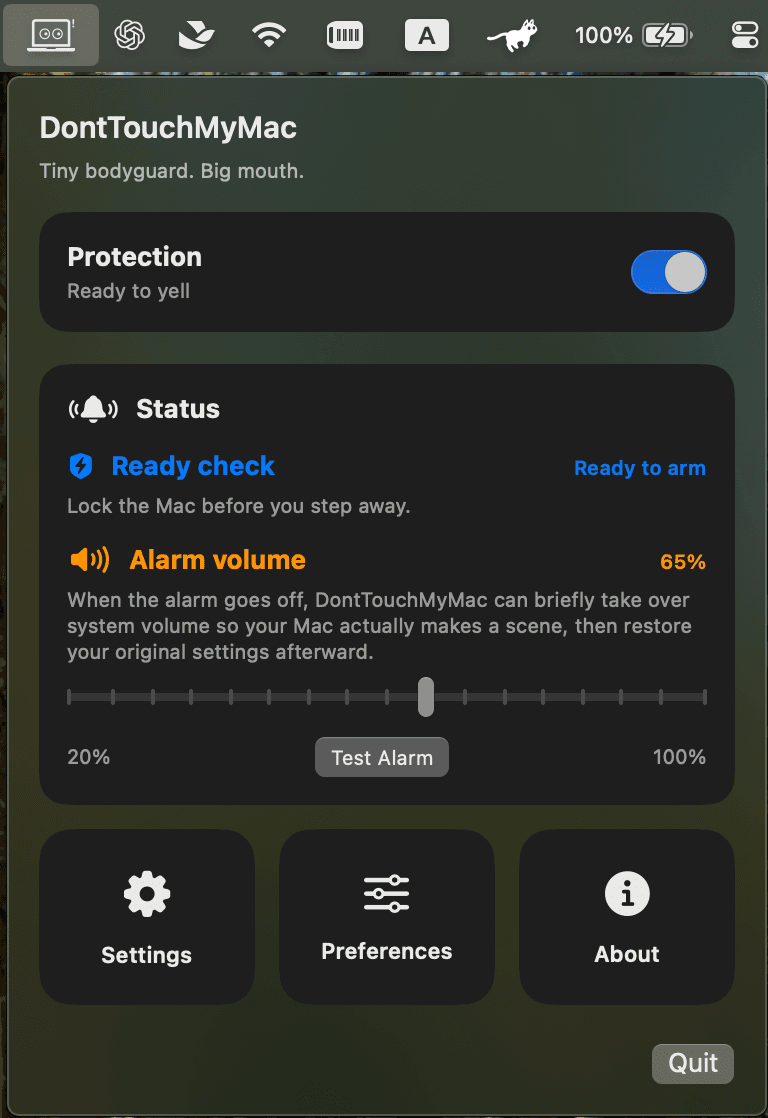
Ready in your menu bar
DontTouchMyMac quietly sits in your menu bar as your Mac's tiny bodyguard with a big mouth.
Feature set
It also does a few useful things
Menu bar only
No dock icon. Just a tiny bodyguard perched quietly at the top of your screen.
Alarm ignores mute
When the alarm fires, it uses the volume you set and does not care if the mute key has opinions.
Real movement detection
A real grab is what it is looking for, not every little wobble.
Adjustable sensitivity
Choose High, Medium, or Low depending on whether you want your Mac to react quickly or stay calmer, and how your desk setup tends to behave.
Launch at login
Launch DontTouchMyMac automatically when you log in, so the tiny bodyguard is already on shift before you even grab coffee.
Custom alarm sounds
Use the built-in alarms or import your own audio if you want your Mac to sound even more unhinged.
$9.996.99. Early Bird Offer(Until May 15, 2026)
At the cost of a Frappuccino, but way more fun than panic-refreshing Find My.
Requires an Apple Silicon MacBook and the willingness to let your Mac yell for help.
SHARE & REWARDS
Want cashback and discount codes?
Post a reel about DontTouchMyMac and we will reward strong reach with a partial refund plus exclusive discount codes.
Reach Target
3,000 plays
Refund 30% and receive 1 exclusive 50% OFF discount code.
Reach Target
8,000 plays
Refund 50% and receive 2 exclusive 50% OFF discount codes.
Each order is eligible for one reward claim only. Aim high!
Platforms
Post your reel on:
 Instagram:Tag @y.chris.y8 and add #donttouchmymac
 TikTok:Tag @ychris88 and add #donttouchmymac
Rules
Refunds are based on the current play count and what you originally paid.
We reserve the right to verify play counts and reject suspicious activity, including bots, scripts, or other artificial inflation.
Email support@donttouchmymac.com for your refund claim. Include the reel link, a screenshot showing the play count, and the email address used to purchase DontTouchMyMac.
FAQ
Frequently asked questions
The current target is Apple Silicon MacBook hardware on macOS 14 or later.
No. DontTouchMyMac is built specifically for MacBook hardware and macOS behavior. Windows laptops do many things, but they still cannot feel that someone just picked them up and walked away.
Not much in normal use. When protection is off, or while your Mac is unlocked, DontTouchMyMac stays pretty lightweight. It only spins up the motion-monitoring path when your Mac is locked and about to arm, so it is not hammering the sensor all day just for fun.
It should not. DontTouchMyMac relies on your MacBook's built-in motion sensor and standard macOS system APIs. It does not require hardware changes, accessories, or opening up your Mac. If your computer is physically damaged because somebody grabbed it, that situation is unfortunately outside what the app can prevent.
Usually not. DontTouchMyMac does not fire on one random noisy spike. It smooths the motion signal, compares it against a short baseline, and only triggers when movement stays strong enough for long enough to look real. A real grab is what it is looking for, not every little wobble.
No. When the alarm fires, DontTouchMyMac forces the preset alarm volume, so the mute key does not get the final word. Once the alarm stops, your original system volume settings are restored.
Definitely yes. Import your own audio and let your Mac yell exactly the way you want it to. Protective? Dramatic? Slightly unhinged? All valid.